Cleaning Duplicacy fossils off the local backup disk is one of the recurring chores I run on GridPane servers. Nothing dramatic: it just has to land in the right window so it doesn’t collide with a running backup. Backblaze I treated as the place that didn’t need attention. The bucket never fills up, nothing ever fails, and everything you could see in it added up to about 110 GB.
The B2 invoice said 607 GB.
The missing 497 GB were 501,495 hidden file versions: fossils that Duplicacy had parked in B2 and never came back to delete. As far as duplicacy backup is concerned, a hidden file does not exist. As far as Backblaze billing is concerned, it very much does. Here’s how they get left behind, how to count yours (read-only, 30 lines of Python), and the one-rule fix that needs no maintenance window at all.
TL;DR
- Duplicacy deletes chunks in two steps: first it turns an unreferenced chunk into a fossil and writes a collection file listing it; a later prune deletes the fossils once every active snapshot has backed up again. On GridPane the collection files get lost and rarely-backed-up sites hold every collection hostage, so fossils pile up. The nightly
gpbup -run-prune-allisn’t-exhaustive, so it never finds fossils without a collection. - Locally a fossil is a
.fslfile you can see withfind. On Backblaze, which has no rename, a fossil is a hidden version: absent fromb2_list_file_names, absent from the panel’s file browser, present on the invoice. - On my bucket: 39,323 visible chunks (109 GB, all referenced by 1,026 revisions of 27 snapshot IDs) and 501,495 hidden versions (497 GB), growing 30 to 77 GB a month.
- Fix: one bucket lifecycle rule,
daysFromHidingToDeleting: 30. No prune, no paused crons, no 500,000 delete calls. 24 hours later: 607 GB → 253 GB billed, with B2 still working through the backlog. A second server’s bucket went 40 → 19 GB.
Why Duplicacy leaves fossils behind
All sites on a GridPane server share one Duplicacy chunk pool per storage. Deleting a chunk outright is dangerous, because a backup running right now for another site may have just decided to reuse it. So prune works like a recycle bin with a receipt:
- A chunk no longer referenced by any snapshot becomes a fossil (locally: renamed to
<hash>.fsl; on B2:b2_hide_file). The list of fossils, the receipt, goes into a fossil collection in the cache of the site that ran the prune:/var/www/<site>/.duplicacy/cache/<storage>/fossils/N, together with the latest revision of every snapshot ID at that moment. - The next prune reads the receipt. If every snapshot ID that is active (last backup under 7 days old) has produced a newer revision since, the fossils are deleted. If a snapshot started using one in the meantime, it is resurrected.
A concrete example. Monday 01:45, prune finds 3,000 chunks that only shop-a’s expired revision 40 used. They become fossils, and collection 7 is written with {shop-a: 52, shop-b: 118, shop-c: 9}, the latest revisions at that moment. Tuesday, shop-a is at 53 and shop-b at 119, but shop-c backs up monthly and is still at revision 9, made four days ago. Active, no newer revision: collection 7 waits. It keeps waiting until shop-c either backs up or its last revision turns 7 days old and stops counting. Every collection created in that week waits behind it.
Now delete shop-c, or wipe .duplicacy/cache on the site that ran the prune, or kill a prune halfway. The fossils are still on disk; the receipt is gone. The Duplicacy source has a comment for exactly this case (“unreferenced fossil can be a result of failing to save the fossil collection file”) and only -exhaustive mode looks for them. GridPane’s prune (gpbup -run-prune-all at 01:45, per site, with -keep retention, once for the local storage and once for Backblaze) doesn’t use it. Its script even tries to add -exclusive when nothing else is running, but appends the flag to a variable it never executes, so that never takes effect either. Those fossils are now permanent.
The local side: a known chore
Locally the fix is duplicacy prune -all -exclusive -exhaustive -storage default. -exhaustive finds fossils without a receipt, -exclusive deletes them immediately, and without -keep no snapshot is touched. The one hard rule of -exclusive is that nothing else writes to the storage while it runs, so the job is really about picking a window. Every GridPane schedule is a file in /etc/cron.d/backup-*; this collapses all of them into “what runs when”:
for f in /etc/cron.d/backup-*; do
  awk -v n="${f##*/}" '!/^#/ && NF {
    t = (n ~ /backblaze/) ? "B2   " : (n ~ /prune/) ? "PRUNE" : "local";
    printf "%s %2s:%02d dom=%s dow=%s\n", t, $2, $1, $3, $5 }' "$f"
done | sort | uniq -c
12 B2 *:30 dom=* dow=* # hourly to Backblaze
9 B2 0:30 dom=* dow=*
2 local *:00 dom=* dow=* # hourly, local
1 local *:20 dom=* dow=*
15 local 0:00 dom=* dow=* # daily locals at midnight
1 local 0:00 dom=* dow=1 # weekly
1 local 0:00 dom=15 dow=* # monthly
1 PRUNE 1:45 dom=* dow=* # GridPane's own pruneFor the local storage only the local and PRUNE lines matter, so: any hour, minutes :25 to :55, outside 00:00 to 02:30. Inside the window, guard it and run:
pgrep -af '^/usr/local/bin/duplicacy' && exit 1      # something is running right now
tsp -L backups | grep -q running && exit 1           # GridPane queues backups via task-spooler
mkdir -p /root/cron-paused
mv /etc/cron.d/backup-hourly-local-* /root/cron-paused/
trap 'mv /root/cron-paused/* /etc/cron.d/' EXIT      # put the crons back even if prune dies
cd /var/www/<any-site>                               # the storage password is in .duplicacy/preferences
duplicacy prune -all -exclusive -exhaustive -storage default -threads 8
duplicacy check -a -storage default -threads 8       # every chunk of every revision must exist
Two details worth knowing: ps aux | grep duplicacy matches its own command line if you run this through ssh host 'bash -c ...', hence pgrep -f; and -dry-run only logs Found unreferenced fossil for orphans, it never says it would remove them. The real run does. This time: 155,462 chunks removed, 222 GB → 82 GB, 8 seconds, every revision intact.
Note what the table also says: 23 Backblaze jobs, 12 of them hourly. Keep that in mind.
Backblaze: fossils you can’t see
B2 has no rename, so Duplicacy fossilises a chunk by hiding it. A hidden version is not returned by b2_list_file_names, doesn’t show in the panel’s file browser, and is billed like any other byte. The only API that shows it is b2_list_file_versions, where it appears as action: "hide". The panel’s bucket size counter includes it, which is why the counter and the file list disagree by hundreds of gigabytes.
Counting them is read-only and needs nothing beyond the Python that’s already on the server. GridPane keeps the B2 key and the bucket name in every site’s /var/www/<site>/.duplicacy/preferences, so:
import json, base64, urllib.request, collections
p = [s for s in json.load(open("/var/www/<site>/.duplicacy/preferences")) if s["name"] == "backblaze"][0]
bucket_name = p["storage"].removeprefix("b2://").split("/")[0]

req = urllib.request.Request("https://api.backblazeb2.com/b2api/v2/b2_authorize_account",
    headers={"Authorization": "Basic " + base64.b64encode(f'{p["keys"]["b2_id"]}:{p["keys"]["b2_key"]}'.encode()).decode()})
auth = json.load(urllib.request.urlopen(req))
def api(name, body):
    r = urllib.request.Request(f'{auth["apiUrl"]}/b2api/v2/{name}', data=json.dumps(body).encode(),
        headers={"Authorization": auth["authorizationToken"], "Content-Type": "application/json"})
    return json.load(urllib.request.urlopen(r))

bucket = [b for b in api("b2_list_buckets", {"accountId": auth["accountId"]})["buckets"] if b["bucketName"] == bucket_name][0]
print("lifecycle rules:", bucket["lifecycleRules"])

versions = collections.defaultdict(list)          # fileName -> [(action, size, ts)], newest first
body = {"bucketId": bucket["bucketId"], "prefix": "chunks/", "maxFileCount": 10000}
while True:
    r = api("b2_list_file_versions", body)
    for f in r["files"]:
        versions[f["fileName"]].append((f["action"], f["contentLength"], f["uploadTimestamp"]))
    if not r.get("nextFileName"): break
    body.update(startFileName=r["nextFileName"], startFileId=r["nextFileId"])

stats = collections.Counter()
for name, vs in versions.items():
    size = sum(s for a, s, _ in vs if a == "upload")
    kind = "HIDDEN" if vs[0][0] == "hide" else "visible"   # newest version is a hide marker => fossil
    stats[kind + " files"] += 1; stats[kind + " GB"] += size / 1e9
print({k: round(v, 1) for k, v in stats.items()})
b2_list_file_versions returns every version of every name, newest first. A chunk whose newest version is a hide marker is a fossil; the bytes are in the older upload version underneath it, and that is what you pay for. On my bucket:
{'visible files': 39323, 'visible GB': 109.3, 'HIDDEN files': 501495, 'HIDDEN GB': 497.4}Two things to get right. GridPane creates one bucket per server, with near-identical names (gridpane-backups-<account>-<server-uuid>...), so match the exact bucket name from preferences, not a prefix; my first attempt counted a different server’s bucket. And the key GridPane writes into preferences is a full-account key (writeBuckets, deleteBuckets, writeKeys…). Worth replacing with one scoped to the single bucket while you’re there.
Why not just run the exclusive prune against B2?
You can: -storage backblaze works the same way. I didn’t, for three reasons. It’s 500,000 b2_delete_file_version calls, an hour or two at 8 threads. For that whole time all 23 Backblaze cron jobs have to stay paused, 12 of them hourly, so a dozen stores go without an off-site backup while it runs. And anything that writes to the bucket in the meantime, say a backup started from the GridPane panel, is exactly the race the two-phase design exists to prevent. The lifecycle rule has none of that.
The fix: one lifecycle rule
B2 lifecycle rules can delete hidden versions after N days. One rule on the bucket, no prefix:
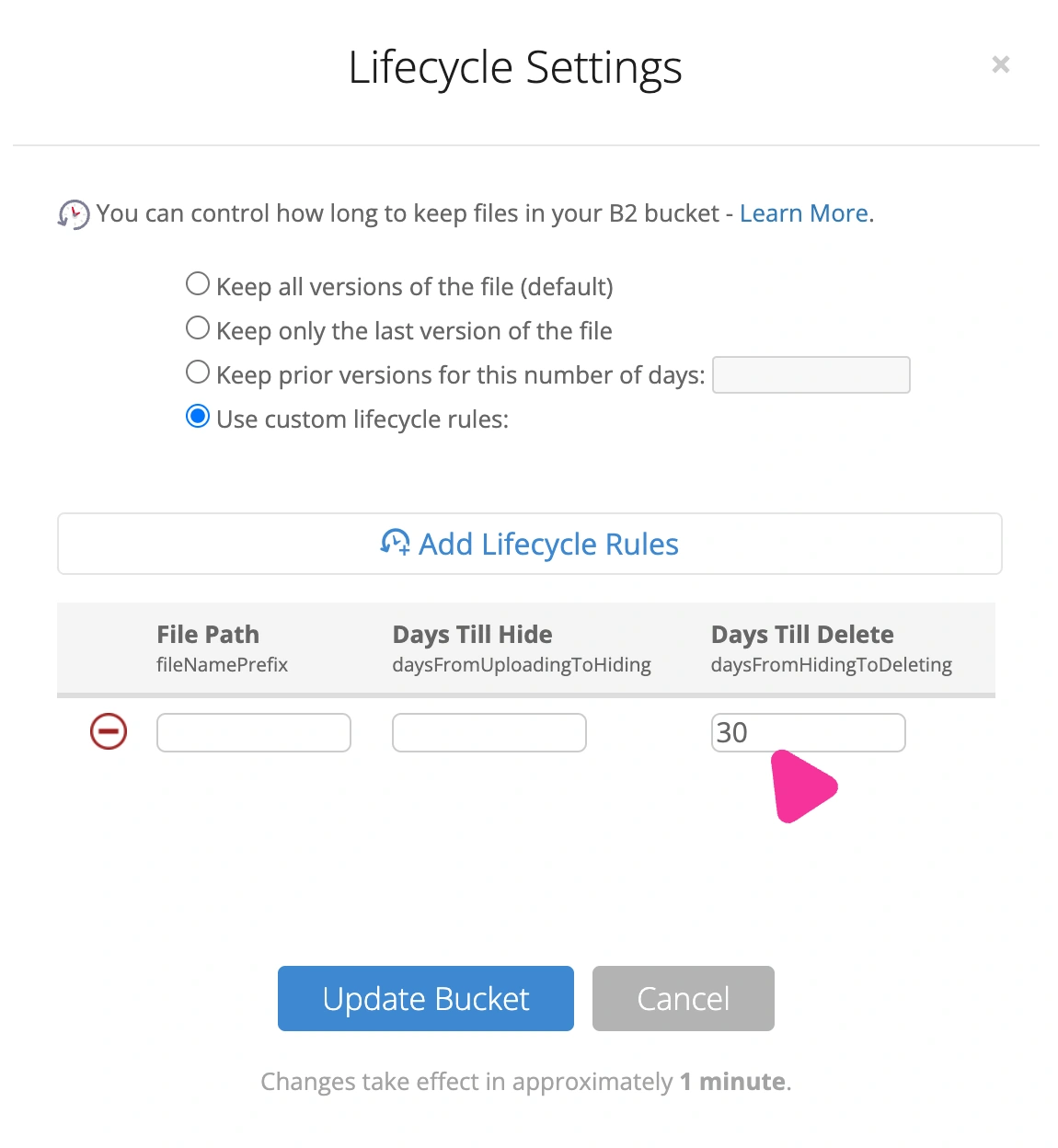
[{ "fileNamePrefix": "", "daysFromHidingToDeleting": 30, "daysFromUploadingToHiding": null }]In the panel: Buckets → Bucket Settings → Lifecycle Settings → Use custom lifecycle rules → Add Lifecycle Rules. Leave File Path and Days Till Hide empty, put 30 in Days Till Delete, Update Bucket. (The radio button Keep prior versions for this number of days: 30 is the same rule under a friendlier label.)
Or, with the api() helper from the snippet:
api("b2_update_bucket", {"accountId": auth["accountId"], "bucketId": bucket["bucketId"],
    "lifecycleRules": [{"fileNamePrefix": "", "daysFromHidingToDeleting": 30, "daysFromUploadingToHiding": None}]})
Why it’s safe. Two separate arguments. First, for duplicacy backup a hidden chunk already doesn’t exist: before uploading a chunk, the B2 backend asks b2_list_file_names whether it’s there, and that call never returns hidden versions. If a backup needs that content again, it uploads it again. Second, and this is the one that actually matters: duplicacy check -a -storage backblaze walks every revision of every snapshot ID and treats a hidden chunk as missing (only check -fossils looks at hidden versions). I ran it before setting the rule and again after the first deletions: 27 snapshot IDs, 1,202 revisions, every referenced chunk present as a visible file. Nothing that can be restored depends on a hidden version, so deleting them can’t break a restore. The rule also sweeps up superseded upload versions (220 on my bucket), which are pure waste.
Why 30 days, not 1. The one case where a hidden version still matters is a backup that checked a chunk’s existence seconds before prune hid it and referenced it anyway. Duplicacy handles that itself: when the collection is processed, the fossil is un-hidden (the hide marker is deleted), and a restore that runs into such a chunk un-hides it on the fly too. Both need the hidden version to still exist. On this server Backblaze collections are processed within days (GridPane prunes the bucket nightly and again after every remote backup; the oldest collection I found was 4.4 days old), and the 7-day dormant-snapshot rule caps how long a rarely-backed-up site can hold one, so 30 days is a comfortable margin. “Keep only the last version” (delete one day after hiding) is not. And if check -a ever does report a missing chunk, check -a -fossils -resurrect brings it back, as long as it happens within those 30 days.
What to expect. B2 applies lifecycle rules once a day, with half a million hidden versions the backlog takes several passes, and the panel’s size counter lags behind the API. 24 hours after saving the rule the panel showed 607 → 292 GB; the API showed 252.8 GB billed and 501,495 → 146,008 hidden versions, with some 2025 leftovers still queued for the next passes. Another GridPane server on the same account went 40 → 19 GB. The floor is whatever was hidden in the last 30 days (about 33 GB here), and that ages out on its own.
Keeping it clean
- The lifecycle rule is permanent; once a month re-run the counting snippet and
duplicacy check -a -storage backblazeto confirm hidden stays near the 30-day floor and every revision is still complete. - Locally, run the guarded exclusive prune weekly inside a window (Sunday 03:00 on mine).
- Scope the B2 key to one bucket.
A hidden version costs exactly as much as a visible one. If your GridPane servers back up to Backblaze and nobody has ever run b2_list_file_versions against the bucket, the odds are good that most of what you pay for there is a file Duplicacy will never read again. Ten minutes with the snippet above tells you. If you’d rather have someone watching this for you, that kind of infrastructure babysitting is part of WooCommerce Care.