TL;DR
- The “architectural floor” was a queue. With D1 sessions on, EmDash ran every query of a page one after another. Turning them off took server time from about 300 ms to 50–67 ms.
- The next traps were in content settings, not code. Two empty byline fields cost up to 90 ms per page.
- Astro 7 builds three times faster, but a post page now sends its first byte later. And the free Workers plan returns 503s under sustained uncached load.
- Measured from the same Warsaw VPS as in April, over three days: an uncached EmDash page now needs 170 ms of server time, against WordPress’s 78 ms. That’s 2.2× slower, down from 8×. With a page cache, EmDash answers in 28 ms.
- The surprise was two lines of config that didn’t exist in April. EmDash’s KV object cache brought a warm render down to 12 ms with a single database query.
Why I went back
In April I published I Bought the Domain Before I Ran the Test. EmDash Still Lost to WordPress. EmDash needed a median 547 ms of server time per page; a hand-coded WordPress needed 68 ms. I blamed the architecture, a database at the edge that answers one query per round trip. I also wrote that if two of three things landed (D1 read replicas, a cache provider for the Cloudflare adapter, faster defaults), this would become a different article.
EmDash has since gone from 0.0.3 to 1.1, so I gave it a rematch. Everything here was measured on 1.1.0. Version 1.2 came out on 6 October, while the tests were running, and the site will move to it soon. This time I traced every database query on every page.
What was slowing it down
The “architectural floor” from April was a queue. With D1 sessions on, EmDash ran a page’s 12–16 queries strictly one after another, at about 25 ms each. Turning sessions off and starting independent queries together took server time from over 300 ms to 50–67 ms: one config line and a handful of Promise.all calls.
emdashcms.pl production, EmDash Server-Timing (render), median of uncached browser visits. 40 requests per page before and after the fixes, 10 per page now.
The rest hid in places nobody would look: content settings, a framework upgrade and a plan limit. More on that below.
I reported what I found upstream as four issues, and the response was fast. EmDash’s bot opened a fix for #3905 46 minutes after my report, and the maintainer merged it four days later. It ships in the release after 1.2.0.
I also sent a fix of my own for another one. #4088 answers a post’s missing tags from data EmDash has already loaded, which saves one query on the home page and the post list. It’s waiting for a maintainer’s review.
Every fix, trap and query count, with code, is in the technical deep-dive in the benchmark repo.
The rematch: three days from the same VPS
An uncached EmDash page got 3.2× faster since April, and the gap to WordPress shrank from 8× to 2.2×.
Setup: the same OVH VPS in Warsaw, the same 13 pages and the same metric as in April. Server time is time to first byte minus DNS, TCP and TLS. It ran every 15 minutes from 6 to 9 October: 317 runs, 24,726 requests and not one error.
| Server time (ms) | April p50 | October p50 | October p95 | October p99 |
|---|---|---|---|---|
| EmDash, full render | 547 | 170 | 348 | 938 |
| EmDash, page cache hit (what readers get) | — | 28 | 51 | 510 |
| EmDash, KV object cache | — | 136 | 218 | 922 |
| WordPress (object cache, no page cache) | 68 | 78 | 160 | 249 |
One caveat in WordPress’s favour: my control site is a hand-coded theme with an object cache, tuned by someone who does this for a living. Its 78 ms is probably among the best 5% of WordPress sites. A typical install with a page builder and a few dozen plugins is very likely slower, often by a lot.
The data also ruled out the every-minute cron as a factor, and cold starts cost EmDash and WordPress about the same.
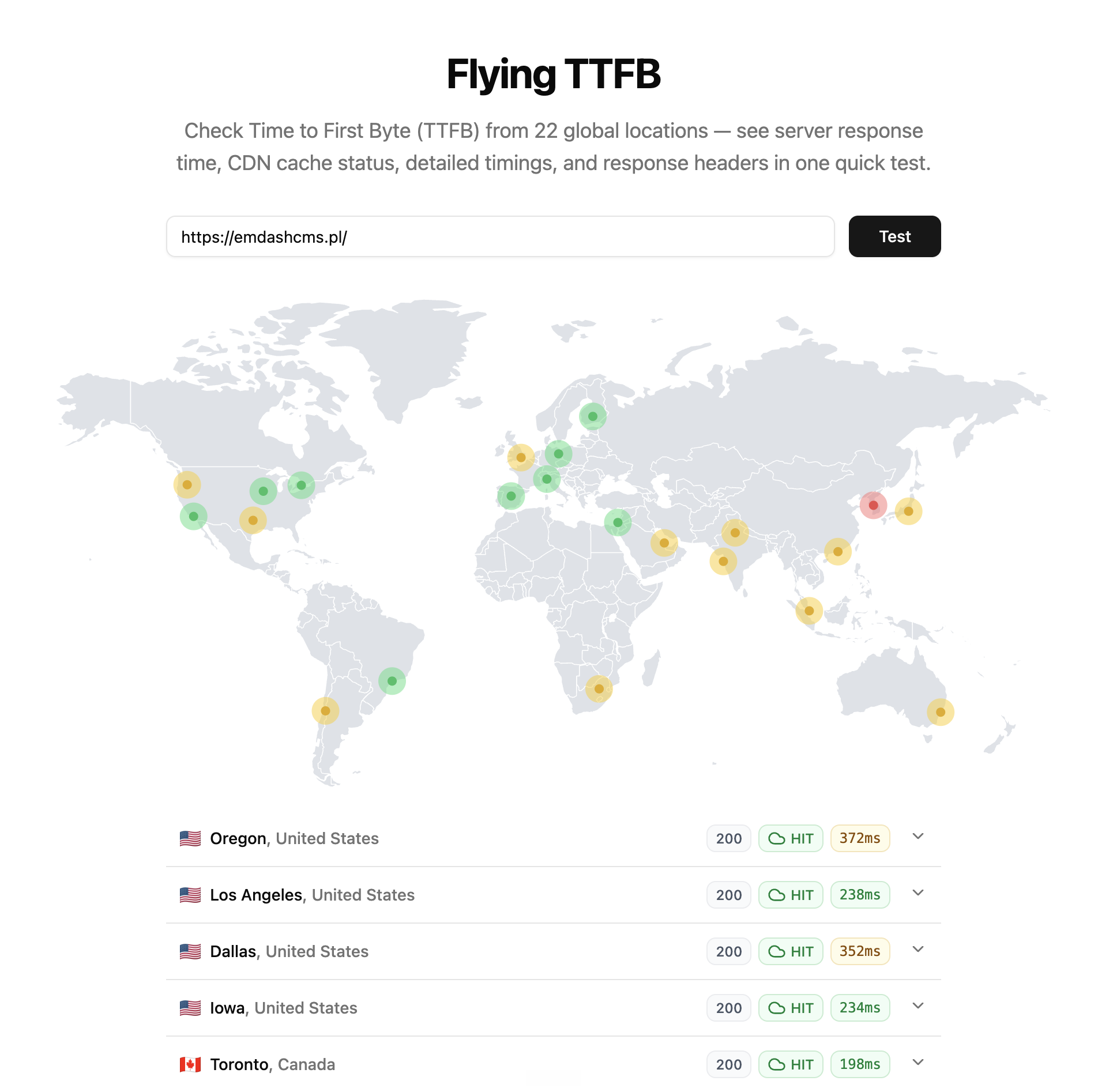
Farther from Warsaw, the page cache does what a CDN should. A second test of the homepage from 22 locations came back as cache hits, with the first byte in 198–372 ms across North America, without touching the database in Vienna.
The two lines I didn’t have in April
EmDash can keep its query results in Workers KV. Turning that on takes two lines, and a warm page then renders in 12 ms with one database query instead of ten.
// astro.config.mjs, plus a KV namespace bound as CACHE in wrangler.jsonc
emdash({ objectCache: kvCache({ binding: "CACHE", defaultTtl: 86400 }) })
I ran an exact copy of the site with only this change at kv.emdashcms.pl, measured alongside the main site and WordPress. It stores whole query results in KV, bylines included, and purges them when content changes. It didn’t exist in April: it shipped in EmDash 0.22.0 on 22 June 2026, two months after my first test.
| KV object cache, uncached page | Render | Server time | D1 queries |
|---|---|---|---|
| First request for a page in a run (KV cold) | 102 ms | 155 ms | 1 |
| Second request within a minute (KV warm) | 12 ms | 67 ms | 1 |
| For comparison: full render, no object cache | 103 ms | 170 ms | 9–10 |
Warm, EmDash renders faster than WordPress and lands at about its server time. KV keeps a value hot at a location for about a minute, so on a site with steady traffic most requests would be warm. My runs came 15 minutes apart, so half of them paid the cold read.
Two catches: on the free plan, raise defaultTtl, because KV allows only 1,000 writes a day. And pick the object cache or a page cache, not both.
For me, this is the result that makes EmDash a legitimate choice. A warm page lands at a tuned WordPress’s speed, and there is still no server: nothing to patch, no PHP or plugins to keep updated, and no VPS for anyone to break into.
Honestly: this is not an easy stack yet
Every millisecond in this article I won back by counting queries myself. Nothing failed loudly. Each cost hid in something that looks harmless:
- a template default (D1 sessions), about 250 ms a page;
- two empty fields in the admin, up to 90 ms;
- a framework upgrade (Astro 7), 40 ms on post pages;
- a plan limit (10 ms of CPU), five minutes of 503s.
WordPress has twenty years of answers for its traps: caching plugins, Query Monitor, a hosting company that has seen it all. With EmDash, you need to read Server-Timing headers and know that every new kind of data is another round trip to D1. You have to keep watching after launch, because one innocent setting can undo the work. Before it is as easy as WordPress, EmDash needs safe defaults, warnings in the admin and one documented way to cache. I think that is still a good while away.
Am I changing my mind?
Yes, mostly. In April I set three conditions. Here is where each stands:
| What I asked for in April | October |
|---|---|
| D1 read replicas | They existed already, in public beta since April 2025; I was wrong about that. For a database in Vienna and readers in Poland, they would add little. |
| A cache provider for the Cloudflare adapter | Landed with Astro 7. I skipped it and made my own cache smarter instead: pages now stay cached for a day, and every publish or edit purges them. |
| Faster defaults | Half there. EmDash fixed its default database path, but its templates still turn on D1 sessions, which bring the one-at-a-time queue back. |
The gap shrank, and this time it’s measured the April way. An uncached EmDash page takes 170 ms of server time against WordPress’s 78 ms: 2.2×, down from 8×. With the KV object cache warm, it’s on par. With a page cache, EmDash answers in 28 ms.
WordPress still wins an uncached page, and my WordPress is a best case. What’s left on EmDash’s side is mostly platform: the hop to the Worker in Warsaw and starting it up, not my code or theirs. In exchange there is no server. Nothing to patch, no PHP or MySQL to tune, and a deploy is one command. Five dollars a month buys you out of the CPU limit.
I gave EmDash a second chance, and it earned it. For me it is now on the same shelf as WordPress: a tool I would pick for a real client site, and I will probably build with it.
One thing hasn’t changed. If a team can work in Git, plain Astro with Markdown is still the better way. A static site has nothing to render, nothing to cache and nothing to watch. But many companies can’t run their content through Git, and their editors need an admin panel. For them, EmDash is now a real option, as long as someone keeps an eye on the queries.
Sources and data
- The April article
- The benchmark repo, with the technical deep-dive, the raw October results and the scripts
- Upstream reports: emdash#3915, #3903, #3904 and #3905
- My fix for #3904: emdash#4088
- Cloudflare docs: D1 read replication and Workers limits